Air Traffic Control
ATC is our communications desk. Everything that arrives on the shared jobs mailbox lands here as a conversation, matched to the person who sent it and the organisation they work for, filed against the job it is about, and kept searchable. Meeting and call recordings arrive in the same place, transcribed and summarised, so the written and the spoken record of a job sit side by side.
ATC is an internal tool for our own back-office team. You will only see it if your account has been given ATC access, and there is no way for a customer, adjuster or homeowner to log in to it. If you need access, ask a platform administrator to add the ATC permission to your account.
The Inbox is where the work happens, and it is the page to bookmark:
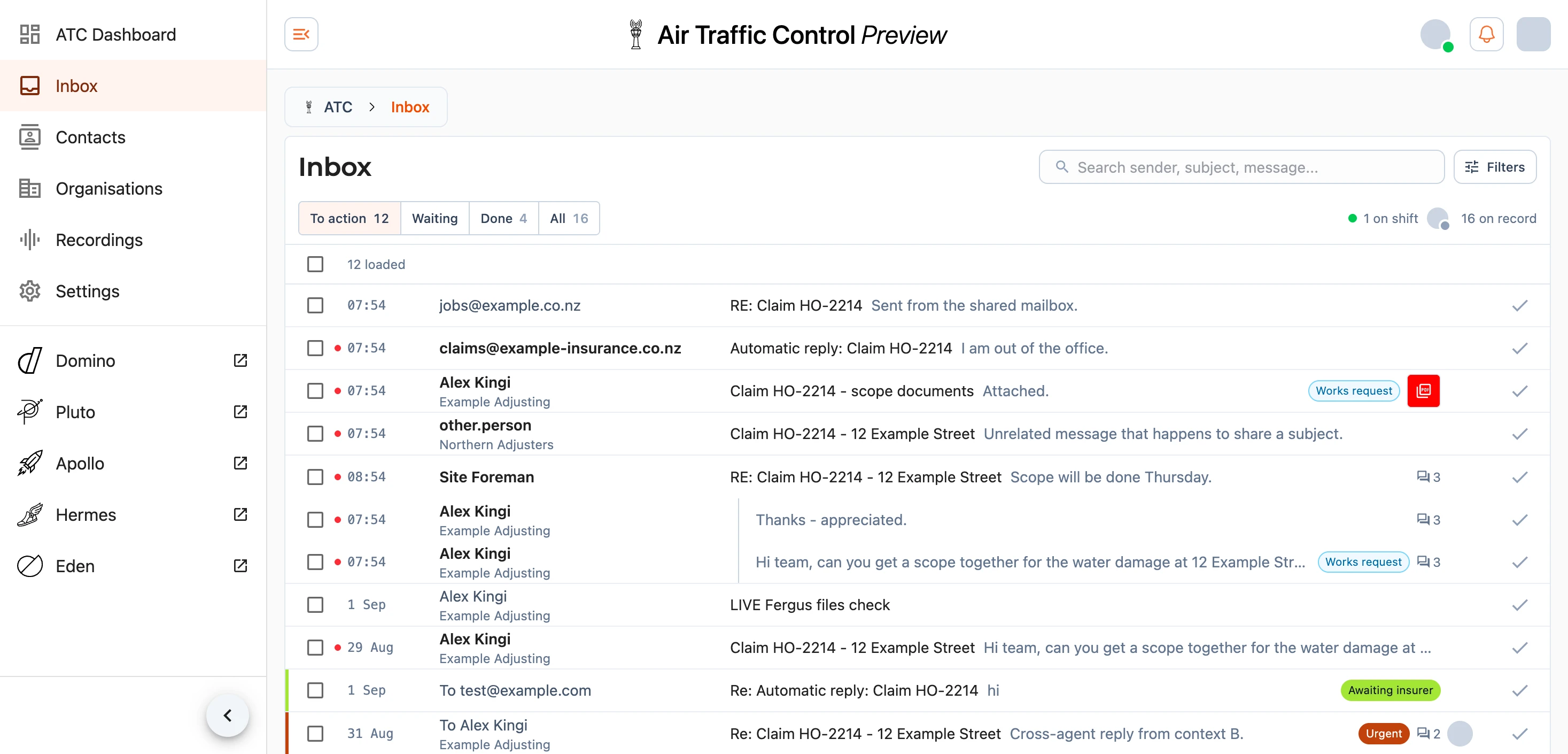
Note: ATC is still in preview. You will see Preview beside its name in the heading, and the product is being changed while you use it. If something does not behave the way this guide describes, tell us at support@samconsulting.co.nz rather than assuming you have done something wrong.
What Arrives Here
Four kinds of record reach ATC today. Email is the main one. The shared jobs mailbox keeps working as it always has, and a copy of every message is forwarded into ATC, which archives the message in full, keeps its attachments, stitches replies into conversations, and works out who wrote it. Replying from ATC, or starting a conversation from it, sends as the jobs mailbox, and a copy of what you send lands back in the shared mailbox so nothing about the existing routine breaks. ATC sits alongside the shared mailbox rather than replacing it.
Staff who carry a Plaud recorder link their account once, and anything they record is collected, transcribed with the speakers separated out, and summarised into a meeting note with its action points. You can also upload an audio file by hand. See Recordings and Recorders.
Meetings are the one thing here somebody writes rather than something that arrives. A site walk or a call gets written up from your own notes and lands on the record of everybody who was there, beside their mail. See Meetings.
Phone calls reach ATC as well. It answers the office line, asks the caller who they would like to speak to and rings that person on their screen and their mobile, and every call is recorded, transcribed and kept in the Call Centre, where messages are worked through. Somebody at a desk can ring out through it as well. See Call Centre.
Note: only a test line runs through ATC so far. Calls to the 0800 number and the office landlines still ring through to mobiles and leave no record in the platform.
Who Appears In ATC
The people you will see in ATC are the ones who write to us: loss adjusters and the firms they work for, insurers, councils, schools and body corporates, and homeowners and tenants writing about their own property. Our own team, alliance members and the subcontractors we use are there too.
ATC keeps the directory of everybody the platform knows, built largely out of the mail itself. Every contact in it is a platform account and every organisation a platform business, so it is also where accounts, businesses, our team's training records and Alliance rate cards are looked after. Adding somebody does not tell them anything until somebody sends their welcome email. See Contacts & Organisations. The CRM also holds the platform's announcements, the banner everybody signed in sees until they close it; see Announcements.
Finding Your Way Around
ATC has its own navigation menu, reached from the menu button in the heading:
- ATC Dashboard - how the desk is doing: conversations opened and cleared, first-response times against each tier's target, sentiment, outcomes and a breakdown by person. It is open to people with ATC dashboard access.
- Inbox - the board of every conversation, and where triage happens.
- Call Centre - every call to the office line, and the voicemail to work through.
- Contacts - the people who write to us.
- Organisations - the firms they work for.
- Meetings - what was said in a room rather than in writing.
- Coverage - where our work comes from, and who covers that ground.
- Competency - the training records and trade licences the SSSP prints for our team and subcontractors.
- Recordings - meeting and call audio with its transcripts and summaries.
- Settings - your own notification, quiet time, phone call, working hours, reading, writing and signature preferences.
On the dashboard, a conversation counts as handled when we reply or when a person marks it done, archived or closed, whichever comes first. First-response times count the business hours set under Targets and skip New Zealand national public holidays, Matariki included. Office anniversary days are not skipped. The line above the tier table gives how many were replied to and how many were done without a reply, then the median time to first opened and how many messages are still unopened, and the table splits the first two by tier. First opened is the time from a message arriving to someone first opening it, and pointing at or tapping that figure shows the date recording began. The Cleared tile still counts every conversation marked done.
The same menu links across to EDEN, Domino, Apollo and the other platform products, which open in their own tab.
Summary Email
The ATC Dashboard at https://eden.samconsulting.co.nz/atc
has a Subscribe button beside Targets in its heading. It opens the "ATC summary" dialog, where you choose how often the report arrives: None, Daily, Weekday, Weekly, Fortnightly, Monthly or Quarterly. Daily goes out every morning including weekends and Weekday on weekdays, and both send nothing on a quiet day. Weekly arrives on Mondays, Fortnightly every second Monday, Monthly on the first Monday of the month and Quarterly on the first Monday of January, April, July and October. Once you are subscribed the button shows your choice, for example Weekly report.
The email covers the period just finished, and a monthly or quarterly one covers the previous calendar month or quarter. It opens with a short paragraph on what needs attention, then the figures: conversations opened and cleared, messages received, replies sent, median first response, first responses within target, turns replied to and turns done without a reply, median first opened and unopened, missed target, reopened, and unhappy or hostile. It also shows how many are awaiting a reply, how many are open and how many are unattended at Red or above, as at that morning. Lists follow for first response by tier, conversations past their target, awaiting a reply, unattended Red or above, unhappy or hostile, people, organisations, outcomes and automation accuracy. Each conversation opens in the Inbox, and every other entry opens the Dashboard on the same period. A PDF of the full report, with the opened and cleared chart, the tier table and the table by person, is attached.
The same choice sits under Email Settings in your profile as the "ATC summary" row, which shows for anybody who can receive it or is still subscribed, and it is described under account settings. Somebody who administers accounts can set it from a person's record, in the Reports section described under Contacts & Organisations.
Suggestions, And Who Decides
ATC reads what arrives and offers to save you work: joining two messages that turn out to be the same matter, filing a conversation against a job, adding a contact or a firm it found in a signature, or marking something urgent. These arrive as suggestions with the evidence behind them, and a person accepts or rejects each one. Nothing is sent, created or merged on your behalf without you pressing the button.
Where you dismiss a suggestion, that decision is kept and the same one is not raised again.
The same applies to the reply ATC offers to draft for you and the write-up it makes of your meeting notes. Both land somewhere you can edit them, and neither is sent anywhere by the machine.
Your Privacy And Ours
The correspondence in ATC is claims material about real people and their homes, and it is treated as such. Every file in ATC - attachments, recordings and transcripts - is stored privately and served through links that expire shortly after they are issued, so nothing is left sitting on a public address. Messages sent to us are kept in full, because inbound correspondence is a business record, and deleting a conversation from the board does not destroy the mail behind it.
If you have a question about anything here, or you have found something that looks wrong, get in touch: