Training & Competency
ATC keeps our training and competency register on the contacts and organisations it describes - the office team and alliance members, the subcontractors we pre-qualify, and the company's own certifications, along with everyone's trade licences - so the SSSP can print what the people running a job hold. It sits in the CRM beside Contacts and Organisations, here:
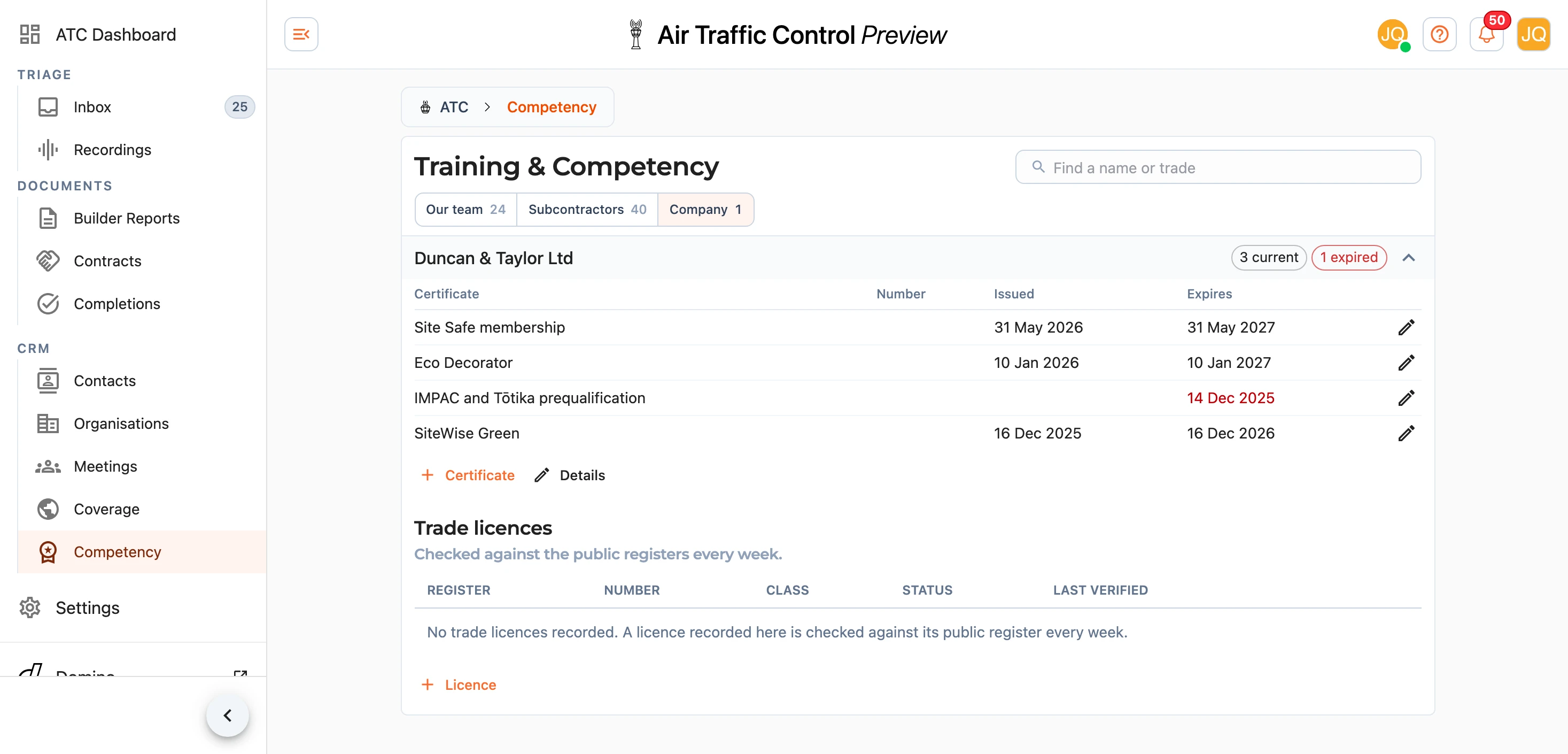
The page has three lists and a search that finds a name or a trade in the one you are looking at. Our team is every contact holding a certificate or a trade licence, Subcontractors is every organisation whose kind is Subcontractor, and Company is the organisation behind the Duncan & Taylor brand. Each row counts the certificates that are current, and flags any that run out in the next 60 days as due soon (in amber) or have already run out as expired (in red). Press a row to see its certificates.
What Prints on the SSSP
The SSSP Document carries a Training & Competency table under Personnel & Compliance. The company's own row comes first, as Principal Contractor, then the Project Manager and Site Foreman set in the builder, then each subcontractor in the plan's Subtrades who is on the register. Nobody else on the register appears, so a plan carries the records of the people on that job rather than the whole team.
Only what is held on the day you publish prints: a certificate with no expiry, or one that has not run out yet. Each prints by its title and any card or ID number, without its dates. An expired certificate stays on the register for the office to chase but drops off the SSSP, and anybody holding nothing current is left out of the table. A trade licence, such as an LBP number, prints only while the public register lists it as current, so a suspended licence does not appear on a plan.
The Project Manager and Site Foreman are found among our contacts by their platform account first and by their name second. A person on Our team with an email address or phone number is already linked to their login, and one with neither is linked once their account's Fergus name or display name matches their contact. Each prints under the name on their contact and the company under the name of its organisation, so the office keeps those the way they should read on a plan.
Note: a change to the register reaches an SSSP the next time it is published, without anything on the plan itself being edited.
Adding and Editing
On Our team, Add asks which contact the certificate is for, then opens the certificate. A person joins the list once they hold one. On Subcontractors, Add creates a new organisation of the kind Subcontractor, with its trade and region. The company is always the one organisation, so there is nothing to add there.
On an open row, Details opens the contact or organisation, which is where the name, role or trade, region, channels and notes are edited. Removing somebody from the register means removing their certificates and licences; the contact or organisation itself stays.
Press Certificate to add one, and the pencil () beside a certificate to change or remove it. Only the title is required; the card or ID number, the issue date and the expiry are all optional. Titles already on the register are offered as you type, so the same course reads the same way on every plan.
The same certificates show under Competency on the person's or firm's own record, where Add and a press on a certificate do the same thing without coming here. See Contacts & Organisations.
Trade Licences
Trade licences - LBP, electrical (EWRB) and plumbing (PGDB) - are kept on the same records, under Trade licences on an open row. Press Licence to record one, choosing the register and typing the number as it is issued. ATC reads the public register as soon as you save, and again every week, and the status beside the licence is what the register said at its last successful check. The buttons on the row check it again now (), open the public register (), edit it or remove it.
A licence recorded here also belongs to the person's or firm's platform account, so the rates Pluto pays against a licence keep working.
For someone on Our team, Certificates they sign lists the trade certificates they sign on a completion pack, each standing on one of their licences.
Note: a licence prints on the SSSP only while its public register lists it as current. A suspended or lapsed licence stays on the record so you can see it, but it is left off the plan.
Subcontractors on the SSSP
The Subtrades field in the SSSP builder's configuration suggests the subcontractors on the register, grouped by trade, with the certificates each one holds listed under their name.
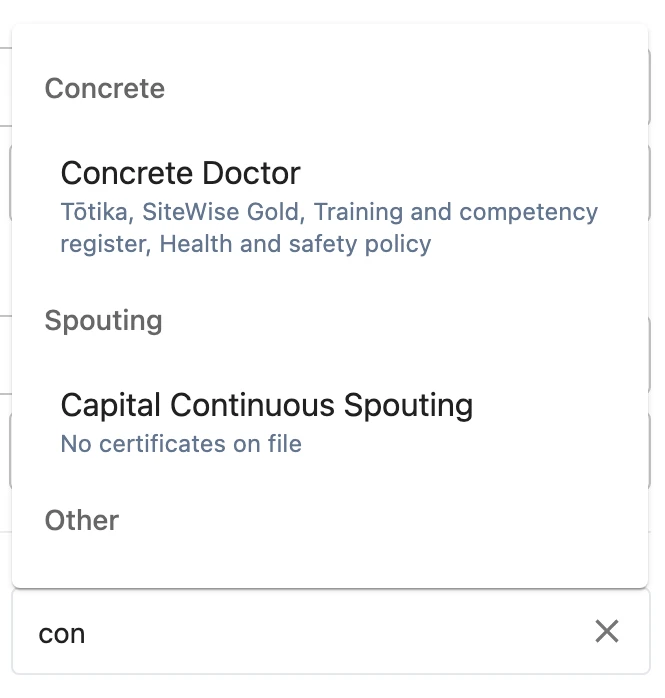
Picking one gives them a sign-off row on the agreement page and prints their certificates under Training & Competency. You can still type in a subcontractor who is not on the register - they get their sign-off row, and nothing prints for them under Training & Competency until they are an organisation of the kind Subcontractor here.
If something on the register does not print the way you expect, let us know at support@samconsulting.co.nz.