The Health & Safety section shows how a job's site safety plan is being kept: the site checks the crew have filed, the toolbox talks they have held, the hazards on the job and how each one is controlled, and the site's rules and emergency details. It is read straight from the job's SSSP, so it changes as soon as a check is filed or the plan is updated. You will find it in a job's navigation menu.
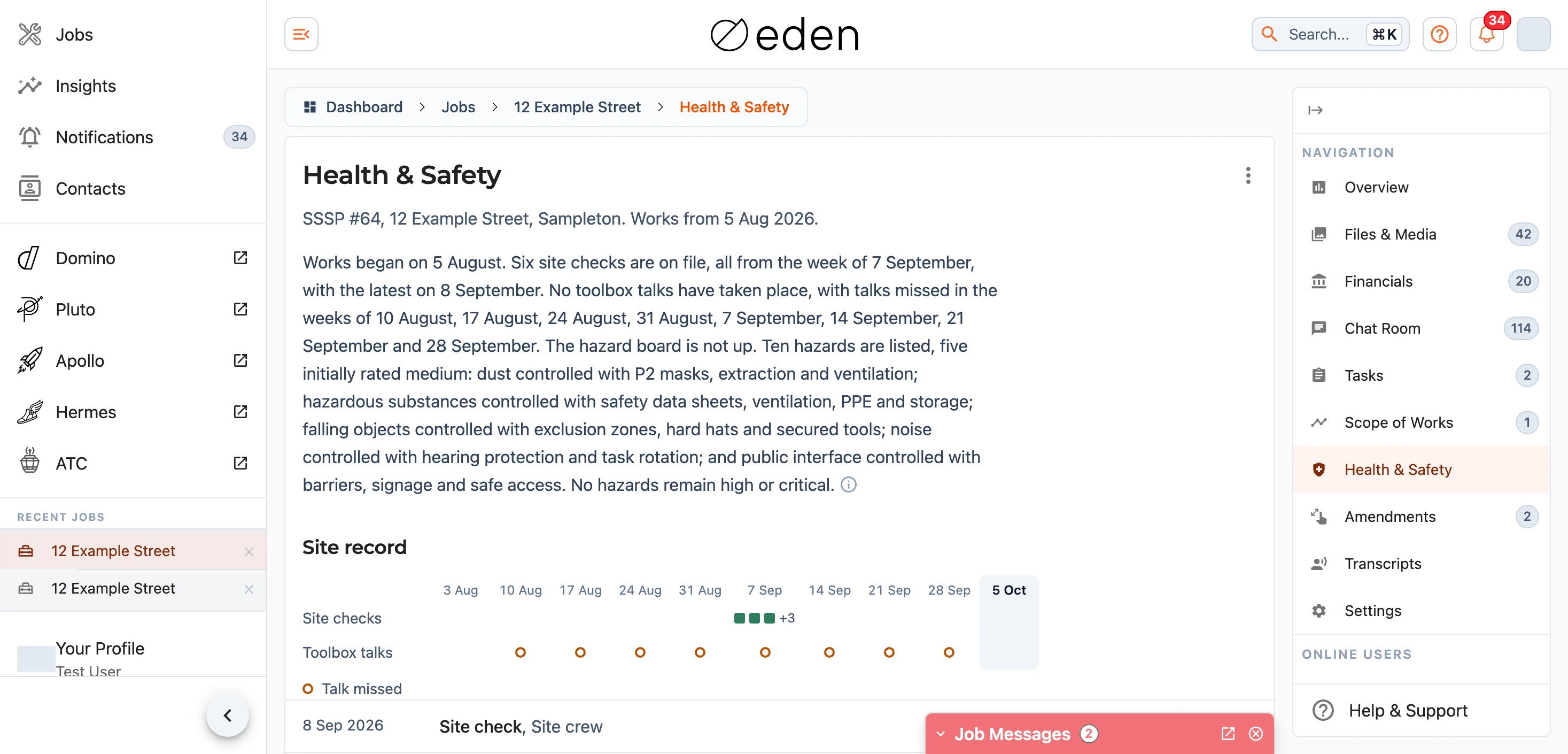
The section is there for the insurers, loss adjusters, project managers and auditors on a job, and for our own team. It is about the site rather than the people on it, so nobody's name, phone number, email address, certificates or signature appear anywhere in it. Homeowners and tenants do not see it.
Summary
The paragraph at the top is a short summary of the record, written automatically from the same details the page shows - hover or tap the icon at its end and it says so. It is written again whenever a check or a talk is filed or the plan changes, and it says plainly where the record falls short, but it is a starting point and the record below it has the detail.
Site Record
The strip across the top of the record has a column for each week of the works. A square is a site check filed that week and a circle is a toolbox talk held. Where the plan asks for regular toolbox talks and a week went by without one, that week carries a hollow amber ring. The current week is shaded and the weeks still to come are faded, and on a phone the strip scrolls sideways.
Below the strip you can see how far the crew has got through the pre-start checklist and the Site Safety Brief, then every site check and toolbox talk on file, newest first. A site check names the role of whoever filed it, such as the Site Foreman, and shows the photos they took on site; select a photo to see it full size or to download it. A toolbox talk shows how long it ran, how many attended and the topics it covered.
Hazards and Controls
Every hazard in the plan is listed, worst first, with the harm it could do and the controls that are in place for it. The track beside each hazard shows its risk on the plan's scale from very low to critical: the ring is where the hazard sits before its controls, the dot is where the controls bring it, and the line between them is how much work the controls do.
Note: a hazard reading None recorded has no controls written against it in the plan yet.
Site Rules and Emergency
The PPE the site needs, its rules, the emergency plan and meeting point, where the first aid kit is, the nearest medical centre and hospital, whether the hazard board is up and whether any asbestos has been found. It is worth a read before you visit the site.
Documents
Download plan saves the safety plan as a PDF to keep or pass on. It is the same plan our crews work to, with the people's details, certificates and signatures, the quote and the scope of works left out. The first download after the plan changes takes a little longer while the PDF is prepared.
For Job Admins
A job admin sees the menu beside the heading:
Hide from third partiestakes the section away from everyone outside our team on this job, and the page showsHidden from third partiesuntil you chooseShow to third partiesagainTurn summary offremoves the summary paragraph, andTurn summary onbrings it backChange planpoints the section at a different safety plan, where the job matches more than oneOpen in Apolloopens the plan itself, for staff who work in Apollo
When a job matches exactly one safety plan, on its job number or through a quote raised for it, the section links it by itself. Where a job matches several, the page lists them for you to Link the right one, and where it matches none there is nothing to show until a plan is created in Apollo.
If something on the record does not look right, contact support@samconsulting.co.nz and our team will look into it.